

CAO Application 2027 – The Ultimate Guide to Applying Online in South Africa
For matric learners and prospective tertiary students in South Africa, navigating higher education admissions can feel overwhelming. Balancing multiple application forms, separate tracking deadlines, and varying fee structures often leads to unnecessary stress.
Fortunately, the Central Applications Office (CAO) simplifies this journey for anyone looking to study in the KwaZulu-Natal (KZN) province. Through a centralized system, applicants can target multiple universities, universities of technology, and private colleges using a single profile.
This comprehensive guide details the exact steps to complete your online registration, compile your supporting documents, manage fees, and track your submission status to secure a spot for the upcoming academic year.
What is the CAO Application System?
The Central Applications Office acts as a centralized processing hub for tertiary institutions across KwaZulu-Natal. Instead of submitting individual profiles to multiple campuses, the CAO allows you to select up to six academic program choices across different institutions on a single portal.
Once submitted, the CAO validates your documentation and distributes your file to your chosen institutions.
Participating Member Institutions
The portal processes applications for major higher education institutions in the region, including:
- UKZN: University of KwaZulu-Natal
- DUT: Durban University of Technology
- MUT: Mangosuthu University of Technology
- UniZulu: University of Zululand
- Select private higher education providers and TVET colleges within the KZN footprint.
Important Note: If you are planning to apply for a technical or trade qualification at a TVET college outside of the CAO’s KZN scope, you must contact that specific TVET college directly to process your admission.
Required Documents and Details Needed
Before launching the online registration portal, gather all required biographical details and academic records. Missing or unreadable files can cause severe processing delays, which might push your application into the highly competitive “Late Application” category.
Ensure you have clear, legible digital copies (preferably in PDF format) of the following items:
- A Valid Identity Document: A certified copy of your South African green ID book or smart ID card. International applicants must provide a valid passport copy.
- Current Academic Records: If you are currently in Grade 12, you must provide your final Grade 11 academic report. You will also need to upload your June and September/trial matric results as soon as they become available.
- Completed Qualifications: If you have already matriculated, a certified copy of your National Senior Certificate (NSC) or Statement of Results is mandatory.
- Legal Status Documents: Non-South African citizens must provide an official study permit or permanent residency documentation.
- Academic History (Transfer Students): If you are transferring from another university, you need an official academic record and a certificate of conduct from your previous institution.
The Critical “Biographical Match” Rule
Your full name, surname, and identity number on your portal submission must match your registration details with the Department of Basic Education (DBE) exactly. If there is a typo or mismatch, the automated system will fail to download your final NSC results at the end of the year, preventing universities from confirming your final admission placement.
Step-by-Step Online Application Process
While paper application forms exist, completing your application via the official web portal is the fastest and most secure method. Follow these sequential instructions to complete your registration:
Step 1: Access the Portal
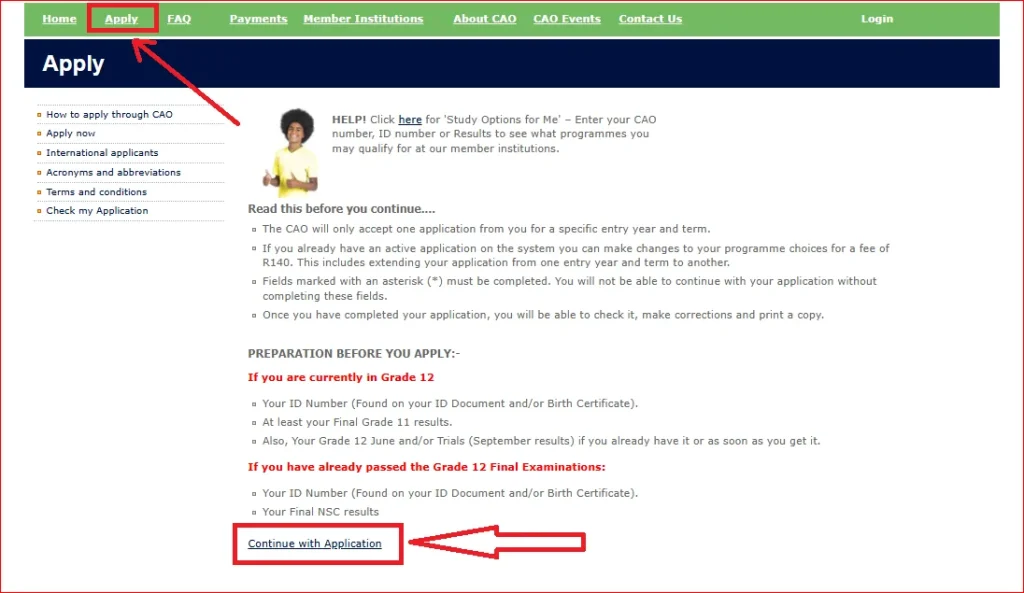
Open your web browser and navigate to the official portal at www.cao.ac.za. Look for the “Apply” tab on the home page menu, click it, read through the introductory terms and conditions, and select “Continue with Application.”
Step 2: Identity Validation
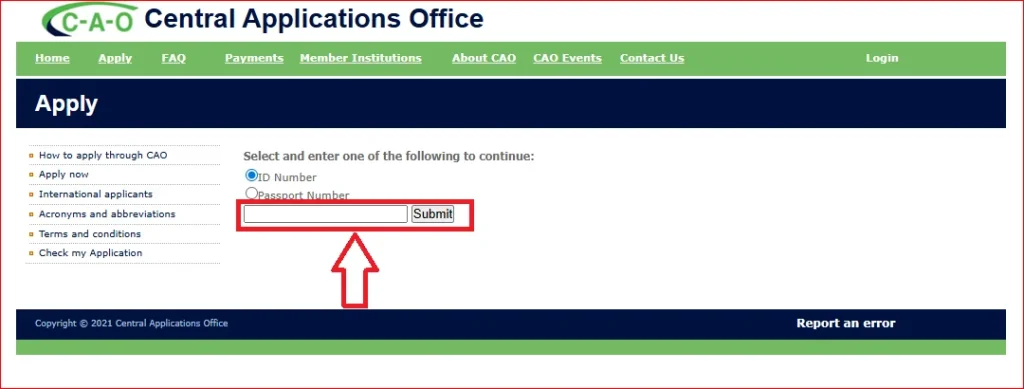
Enter your South African ID number or international passport number into the prompt, then click “Submit.” The system will scan its database to check if you have an existing profile for the current entry year.
Step 3: Biographical and Contact Entry
Complete your personal details, including your full legal names, gender, physical address, and next of kin information. You must input an active, working cell phone number and a valid email address, as institutions communicate official conditional offers exclusively via SMS and email.
Sep 4: Select Your Academic Choices
Enter up to six academic program choices using their specific alpha-numeric program codes (found in the official handbook). Arrange these choices in your strict order of preference, as highly competitive faculties give preference to applicants who rank their program as Choice 1 or Choice 2.
Step 5: Secure Your Credentials
Review your entry summary. Once you click next, a popup window will display your unique CAO number, a temporary password, and an EasyPay number. Please take a screenshot or write these down immediately; they will also be sent to your registered email address.
Step 6: Final Processing Submission
Click on “Continue with Online Application,” double-check that your school subjects and marks are correct, and click “Process My Application.” A confirmation message will appear on screen indicating your data has been queued.
Administration Fee Structure and Payment Methods
Your profile will not be forwarded to any university or college until the required administration fee is cleared by the bank.
Fee Tiers
- On-Time Applications: The standard processing fee is R250 for South African citizens (R300 for international applicants). To qualify for this rate, your application and fee must reach the clearing desk on or before 31 October for first-semester entries.
- Late Applications: Submissions or payments received on or after 1 November incur a late fee penalty, raising the total cost to R470 for local applicants (R580 for international applicants).
How to Make Your Payment
The system does not accept cash deposits or direct EFT transfers into a standard bank account. You must use one of these two verified channels:
- Online Card Payment: Log into your profile on the website, click on the “Payments” icon, and complete a secure credit or debit card transaction. Your profile updates almost immediately.
- EasyPay Outlets: Take your unique EasyPay number generated during registration to any authorized retail outlet, including Pick n Pay, Checkers, Shoprite, Woolworths, or Boxer stores, and pay at the till point.
Processing Time: Your data will be released to your selected universities on the next business day after the bank clears your transaction.
How to Upload Outstanding Documents
If you need to update your grade 12 trial marks or attach a certified copy of your ID card after submitting your initial application, do not open a new profile.
To upload documents to your active file:
- Visit www.cao.ac.za and click on the “Upload My Documents” icon.
- Log in by entering your CAO number and password.
- Select the correct document category from the dropdown menu (e.g., Grade 11 Final Report or Identity Document).
- Attach your clear digital file and click “Submit My Documents.”
Key Deadlines and Closing Dates
Closing dates are determined by the individual tertiary institutions and specific faculties, rather than a single deadline for the entire portal.
| Institution / Faculty Type | Typical Closing Window | Notes |
| Health Sciences / Medicine | 31 August | Extremely competitive; no late applications considered. |
| Engineering / Architecture | 30 September | Strict departmental limits based on lab capacities. |
| Faculty of Education / Law | 30 September | High application volumes; early submission advised. |
| Management & Humanities | 31 October | Standard closing window for on-time fee brackets. |
Always check the program availability matrix on the official website before paying, as individual programs close immediately once they hit capacity.
Tracking Your Application Status
Once you send your documentation to the universities, you can monitor the progress of your profile at any time.
- Online Tracking: Visit the website homepage, click on “Check My Application,” and enter your CAO number or ID number.
- Telephonic Self-Help: Call the interactive self-help hotlines at 031 268 4444 or 0860 860 226 to listen to an automated readout of your file status.
Common Status Terms Explained
- Waiting for a Decision: The institution has received your file and is reviewing your academic merit against their admission point score (APS) requirements.
- Conditional Offer / Provisional: The university has reserved a space for you based on your Grade 11 or mid-year Grade 12 results. This placement is legally dependent on you maintaining those marks in your final NSC examinations.
- Firm Offer: You have been officially accepted into the program. You must respond promptly to secure your registration spot.
What If You Are Unsuccessful?
If your tracking status returns as unsuccessful or has not met program ranking criteria, you have alternative options to explore:
- Change of Mind (COM): If you want to change your program choices or swap to a field with lower APS requirements, you can submit a “Change of Mind” request online. This update carries an administration fee of R140 and allows you to replace your existing program selections with open alternatives.
- The Central Application Service (CAS): The Department of Higher Education and Training has discontinued CACH and replaced it with the Central Application Service (CAS). If you find yourself without a tertiary placement when final matric results drop in January, you can connect with CAS via WhatsApp at 081 308 4196 to discover available spots across universities and colleges nationwide.
FAQs About CAO Application
Conclusion
The CAO application system streamlines university admissions across KwaZulu-Natal, making it easier for students to apply, track progress, and secure placements. By submitting accurate information, meeting deadlines, and monitoring your application status regularly, you can maximize your chances of receiving admission offers and starting your higher education journey successfully.