CAO Email Address For Proof of Payment
CAO Email Address For Proof of Payment If you have recently paid your CAO (Central Applications Office) administration fee and are wondering where to send your proof of payment, you are not alone. Thousands of South African students face this question every year during the university application process. This comprehensive guide will walk you through everything you need to know about the CAO email address for proof of payment, how the payment system works, what to do when your payment is not reflecting, and how to resolve common payment-related issues.
What is the CAO, and why is payment important?
The Central Applications Office (CAO) is a centralized application processing body based in Durban, South Africa. It serves as the gateway for students who wish to apply to multiple universities and higher education institutions through a single platform. The CAO handles applications for institutions primarily in KwaZulu-Natal and surrounding regions.
To process your application and make it available to your chosen institutions, you must pay the required administration fee in full. Without this payment, the CAO will not send your application to the universities you selected, regardless of your academic record.
CAO Email Address for Proof of Payment
The official and most important piece of information you need is the CAO proof of payment email address:
This is the dedicated email address confirmed directly on the official CAO website. According to the CAO’s Payment Successful page (cao.ac.za), this email address is clearly shown for all payment inquiries:
“For inquiries, e-mail [email protected] or contact our Call Centre at 031 268 4444.”
When Should You Send Proof of Payment to CAO?
There are several situations where you may need to email your proof of payment to [email protected]:
1. Your Payment Is Not Reflecting After 3 Days
According to the official CAO website, payments may take up to 3 days to process. If your payment has still not reflected after 3 business days, please forward your proof of payment to [email protected], including your CAO reference number.
2. You Paid to the Wrong Account
If you accidentally made a payment to a member university instead of directly to the CAO, please forward your proof of payment to [email protected] so the team can verify and assign the payment to your application. Please include your CAO reference number in the email.
3. You Want to Transfer Payment from an Old Application
If you previously had a CAO application and made a payment and now wish to use that same payment for a new application, email your request to [email protected] asking them to transfer the payment from your old CAO number to your new one.
4. You Want a Refund for Overpayment
If you accidentally overpaid, you can request a refund by emailing [email protected] with your banking details. Please note that a 10% handling fee will be deducted from the refund amount.
How to Send Proof of Payment to CAO
Step 1: Open your email client (Gmail, Outlook, Yahoo, etc.)
Step 2: Compose a new email addressed to [email protected]
Step 3: In the subject line, write “Proof of Payment – CAO Number [Your Number].”
Step 4: In the body of the email, include:
- Your full name
- Your CAO Number
- Your ID or passport number
- A brief explanation of your query
Step 5: Attach your proof of payment (bank receipt, EFT confirmation, or EasyPay slip)
Step 6: Send the email and keep a copy for your records
How to Pay Your CAO Administration Fee
Online Payment
- Visit www.cao.ac.za
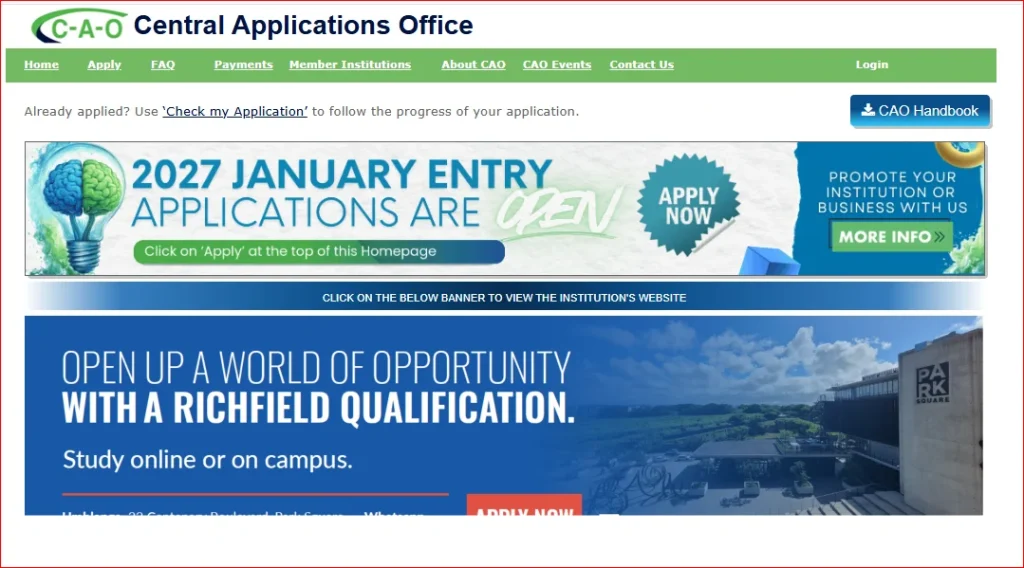
- Click on “Payments” from the top menu
- Enter your CAO number and click “Submit.”
- Follow the on-screen prompts to complete payment by credit card
Payment at EasyPay Outlets
Pay in person at any of these nationwide EasyPay outlets:
- Shoprite
- Checkers
- Pick n Pay
- Boxer Superstores
- Woolworths
Always use your unique EasyPay number as the payment reference.
Note: CAO offices do not accept face-to-face payments. All payments must be made online or at EasyPay outlets.
CAO Administration Fee
Before diving into the proof of payment email process, it is important to know how much the CAO charges:
- South African applicants (on-time fee): R250
- International applicants (on-time fee): R300
- Late administration fee for South Africans: R470
- Late administration fee for international applicants: R580
- Change of Mind (COM) administration fee: R140 per submission
Late fees apply from 1st November each year. Always refer to the current CAO Handbook or the official website at www.cao.ac.za for the most up-to-date fee structure, as these amounts may change annually.
Where to Find Your EasyPay Number
- In the original registration email sent by CAO when you applied
- In CAO letters such as Payment Outstanding, Acknowledgement, or Summary letters
- By calling the CAO Call Centre on 031-268-4444 during office hours
CAO Official Contact Details
| Contact Method | Details |
|---|---|
| Payments Email | [email protected] |
| General Enquiries Email | [email protected] |
| Call Centre | 031 268 4444 |
| Share Call | 0860 860 226 |
| Fax | 031 268 4422 |
| Website | www.cao.ac.za |
| Physical Address | Gate 11, Mary Thiphe Street, Cato Manor, Durban |
| Postal Address | Private Bag X06, Delbridge, 4014 |
FAQs About CAO Email Address For Proof of Payment
Conclusion
Navigating the CAO payment process can feel overwhelming, especially for first-time applicants. The most important thing to remember is that the official CAO email address for proof of payment is [email protected]. Whether your payment is not reflecting, you paid to the wrong account, or you need a refund, this is your go-to email address for resolving any payment-related issue.